How do I use Ploom AURA?
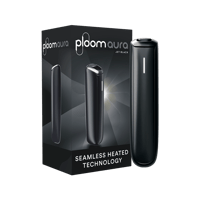
Getting started with Ploom AURA is extremely easy.
1. Open the cover on your device to reveal the heating chamber. (When you open the cover, the LED line will display your device’s current battery level.)
2. Gently insert the stick until it stops – the colored line on the stick will disappear just below the opening (you can still see the line if you hold the device at an angle).
3. With the Automatic Start function, the device will begin heating automatically, and the LED line will blink to indicate that preheating is in progress. Wait until the device vibrates twice.
4. Gently inhale at first and experience the session. For the best experience, we recommend taking slow puffs lasting 2–3 seconds. Your session will last five minutes and allows unlimited puffs \[1].
To use Ploom AURA without the Automatic Start function, press and hold the button area just below the LED line for approximately one second. You will feel a long vibration and see a blinking LED light indicating that your device has started heating.
Ploom AURA preheats in 25 seconds.
\[1] ≥20 sticks under ambient conditions of 25°C. The number of sticks per charge may vary depending on the heating profile, battery condition, and actual conditions of use.condition. No of sticks per charge vary with heating profile, battery degradation and actual usage conditions.